Firma PDF online
Firma e richiedi firme per i PDF direttamente da Gmail.

Scelto da +3M utenti




Usato dai professionisti di







Funzioni essenziali per firmare documenti senza complicazioni
Lo strumento Firma PDF di Mailsuite cambia il modo in cui gestisci le firme sui documenti. Funziona direttamente nella tua posta in arrivo, per inviare, firmare e monitorare i documenti senza sforzo.
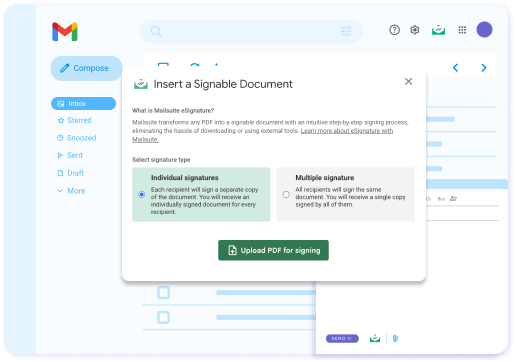
Non serve nessun tool esterno: invia direttamente da Gmail
Mailsuite trasforma qualsiasi PDF in un link firmabile incorporato nella tua email, così lo invii come una email qualsiasi, senza allegati né strumenti extra. Le copie firmate vengono conservate in modo sicuro.
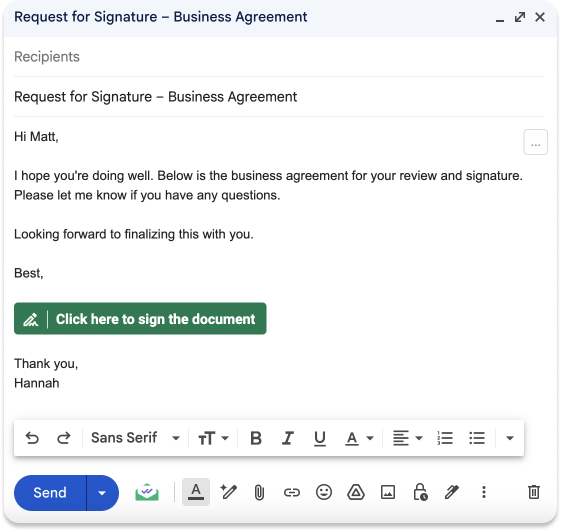
I destinatari possono firmare il PDF tramite un link
I tuoi destinatari non devono scaricare un allegato, firmarlo e rimandarlo indietro. Ricevono invece un link a un processo di firma guidato passo passo che consegna automaticamente il documento firmato a tutte le parti alla fine.
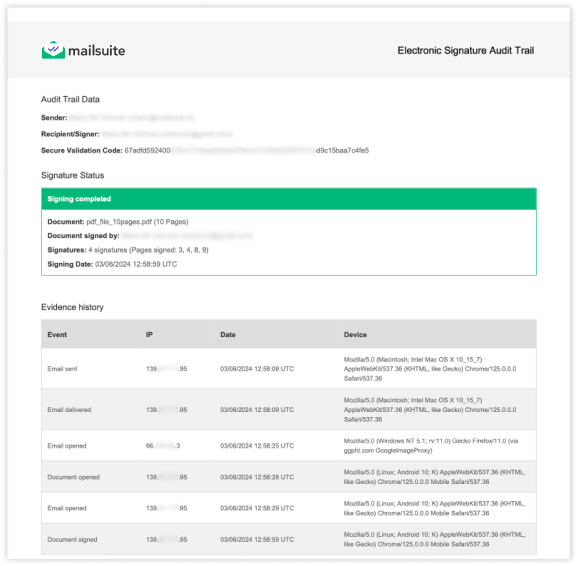
Ottieni firme legalmente vincolanti
Ricevi un registro di controllo completo che verifica ogni firma. Saprai chi ha firmato il documento, quando lo ha fatto e da dove, incluso indirizzo IP e dispositivo. Utile come prova in dispute legali e verifiche di conformità.

Crittografia avanzata e infrastruttura cloud sicura
Mailsuite è partner ufficiale di Google Cloud e supera l'audit di sicurezza annuale richiesto da Google. Ha anche la certificazione di sicurezza ISO 27001. Il nostro servizio gira su un'infrastruttura molto sicura, con tutti i dati criptati con lo standard di crittografia avanzata a 256 bit (AES-256) all'interno di un cloud privato virtuale (VPC) ospitato da Amazon Web Services (AWS) in Irlanda.
Iniziare è facilissimo
-
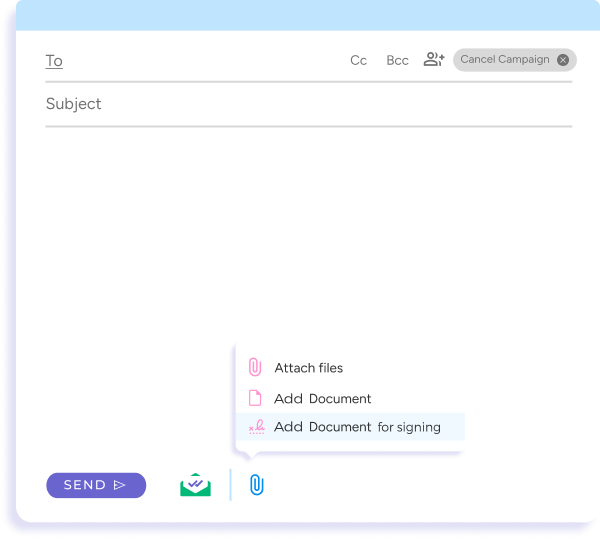
Passo 1
Allega un documento da firmare
Allega il PDF alla tua email come faresti normalmente.
-
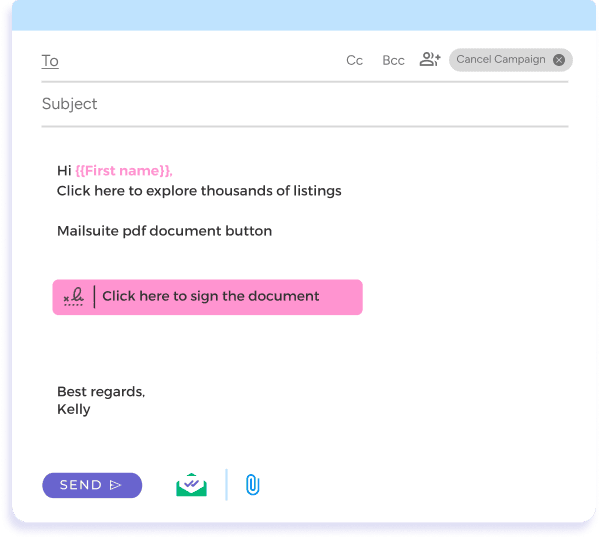
Passo 2
Invia il tuo documento da firmare
Quando finisci di scrivere l'email, ti basta premere Invia.
-
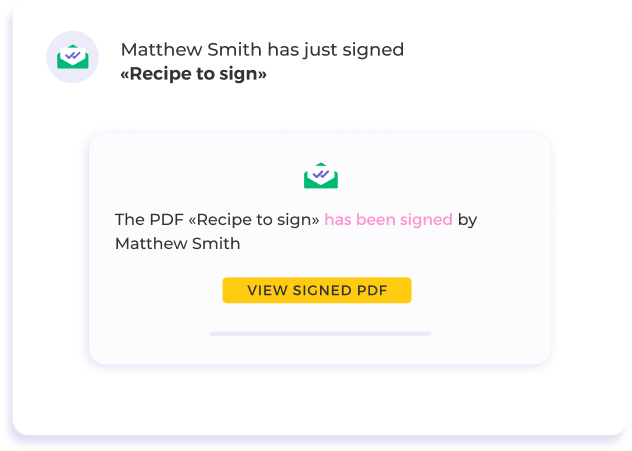
Passo 3
Monitora il processo di firma
Ricevi notifiche appena il tuo documento viene firmato e consultalo firmato direttamente dalla tua casella di posta.
E molte altre funzionalità
Ottieni firme dalla tua casella di posta
Invia e ricevi documenti da firmare senza uscire dalla tua casella di posta. Con Mailsuite converti qualsiasi PDF in un documento firmabile in pochi secondi.
Notifiche di firma PDF in tempo reale
Resta aggiornato con avvisi istantanei quando il tuo documento viene visualizzato o firmato. Questo feedback immediato ti permette di fare follow-up subito, senza rallentare i tuoi progetti.
Statistiche dettagliate sui documenti
Capisci il comportamento dei destinatari con statistiche avanzate. Dalle visualizzazioni del documento ai tassi di completamento, i nostri dati dettagliati ti aiutano a ottimizzare la tua strategia di firma.
Controlli di firma PDF personalizzabili
Imposta i parametri di accesso al documento, incluse le date di scadenza, per mantenere il controllo sulle tue informazioni sensibili.
Accedi ai tuoi documenti firmati quando e dove vuoi
Con il link fornito, puoi visualizzare e scaricare il documento firmato per il tuo archivio in qualsiasi momento. Ovunque tu sia, i tuoi documenti importanti sono a un clic di distanza.
FAQ
Le tue domande sulla firma dei documenti, chiarite
-
Come posso inviare un PDF per la firma direttamente dalla mia email?
Con la nostra soluzione Firma di PDF, invii PDF da firmare (firma PDF online) direttamente dalla tua email, senza complicazioni. È un processo pensato per essere semplice, che ti permette di inviare documenti per la firma elettronica senza uscire dalla tua casella di posta -
Cosa succede dopo aver firmato un PDF elettronicamente o dopo che qualcuno firma un documento online?
Non appena un documento viene firmato digitalmente, ricevi subito una notifica via email che conferma la firma. Questa notifica include un link per vedere il PDF firmato online, che puoi scaricare per archiviarlo. Inoltre, la nostra piattaforma ti avvisa in tempo reale delle visualizzazioni del documento, per tenerti aggiornato su ogni fase del processo -
È sicuro firmare PDF digitalmente e usare la Firma di PDF per documenti legali?
Assolutamente sì. La nostra Firma di PDF punta molto sulla sicurezza, soprattutto per documenti sensibili e legali. Grazie a funzioni come il controllo degli accessi al PDF e le date di scadenza, puoi firmare PDF elettronicamente e inviarli per la firma con la massima tranquillità -
Posso monitorare l'interazione con i miei documenti firmati?
Sì. La nostra Firma di PDF ti offre statistiche complete, con dati pagina per pagina su come i destinatari interagiscono con i tuoi documenti. È particolarmente utile per capire l'interesse generato e ottimizzare i prossimi documenti -
Come inizio a inviare documenti con la Firma di PDF?
Iniziare è facilissimo. Basta cliccare sul pulsante "Installa gratis" per integrare la Firma di PDF nel tuo flusso di lavoro. Avrai accesso immediato e potrai iniziare subito a inviare documenti per la firma digitale, semplificando tutta la gestione dei tuoi documenti -
Qual è la dimensione massima di un PDF che si può firmare?
I PDF possono pesare al massimo 10 MB
Centro Privacy e Sicurezza
I servizi di Mailsuite e Mailtrack sono scelti da oltre 116.000 abbonati paganti e aziende in tutto il mondo.
Leggi di più